A due diligence data room is the single place where a deal’s most sensitive records live while buyers, advisors, and internal teams review them. Get the setup wrong, and a process that should take six weeks stretches into three months of chasing documents. Get it right, and both sides move through review and negotiation without friction.
According to PwC’s 2026 Canadian M&A outlook, Canada recorded 642 deals worth $138.8 billion in a single quarter of 2025. Most likely, many of the deals undergo a virtual data room due diligence workflow, which only proves that the choice of provider and process matters if you want your deal to succeed.
This guide covers what a data room for due diligence does, which virtual data room providers in Canada dealmakers use most, and how to build one from a blank folder to a fully indexed project. You will also find a due diligence checklist, sell-side and buy-side responsibilities, and Canadian considerations.
The best virtual data rooms for due diligence
Picking the best virtual data room for due diligence in 2026 depends on deal size, budget, and how much hands-on service your team needs. The table below compares seven providers that legal counsel, teams evaluating a virtual data room for private equity deals, and corporate development teams commonly shortlist.
| Provider | Key Features | Areas of Due Diligence Expertise |
|---|---|---|
| Ideals Visit Website |
| ✅ M&A ✅ Human Resources ✅ Asset ✅ Customer/Sales ✅ Real estate ✅ Fundraising ✅ Financial ✅ Legal ✅ Intellectual ✅ Tax |
| Merrill Datasite View Profile |
| ✅ M&A ❌ Human Resources ✅ Asset ✅ Customer/Sales ✅ Real estate ✅ Fundraising ✅ Financial ✅ Legal ✅ Intellectual ✅ Tax |
| Intralinks View Profile |
| ✅ M&A ❌ Human Resources ✅ Asset ✅ Customer/Sales ❌ Real estate ✅ Fundraising ✅ Financial ✅ Legal ✅ Intellectual ✅ Tax |
| Firmex View Profile |
| ✅ M&A ❌ Human Resources ✅ Asset ✅ Customer/Sales ❌ Real estate ✅ Fundraising ✅ Financial ✅ Legal ✅ Intellectual ✅ Tax |
| Ansarada View Profile |
| ✅ M&A ❌ Human Resources ✅ Asset ✅ Customer/Sales ❌ Real estate ✅ Fundraising ✅ Financial ✅ Legal ❌ Intellectual ❌ Tax |
How we evaluated providers
We built this comparison from each provider’s official website, published pricing pages, and verified user reviews on G2 and Capterra. We did not use competitor blogs or unaffiliated data room review sites as sources for pricing or feature claims, since those sites often have referral relationships with the vendors they rank. For our full methodology, see how we evaluate virtual data room providers.
| Evaluation factor | What we checked | Why it matters for due diligence |
|---|---|---|
| Security certifications | ISO/IEC 27001, SOC 2, GDPR, HIPAA status on the vendor’s own site | Confirms the platform meets recognized standards for confidential documents |
| Pricing transparency | Whether costs are published or require a sales call | Affects budget planning, especially for smaller deals |
| Core diligence features | Q&A workflow, indexing, granular permissions, watermarking | These directly shorten the document review process |
| Verified user feedback | G2 and Capterra ratings and written reviews | Surfaces real strengths and complaints from people who use the platform |
| Support model | Live chat, phone, dedicated project managers | Matters most during time-pressured due diligence data room projects |
Who should use a due diligence data room?
Any transaction that involves sharing confidential documents with an outside party benefits from a secure data room rather than email or generic cloud storage.
| User type | Typical use case |
|---|---|
| Corporate development teams | Running due diligence on an acquisition target |
| Private equity firms | Reviewing multiple deals at once across a pipeline |
| Investment bankers and M&A advisors | Managing sell-side due diligence data room projects for clients |
| Law firms and legal counsel | Reviewing contracts, litigation records, and compliance documents |
| Startups raising capital | Sharing financial and legal documents with potential investors |
| Real estate and infrastructure teams | Sharing leases, permits, and environmental records during a transaction |
Read more: Founders preparing for their first raise can also see our guide to a data room for startups or a fundraising data room.
What is a due diligence data room?
A due diligence data room is a secure online workspace built to store, organize, and share the financial documents, legal documents, and other sensitive information a buyer needs to evaluate a target company. It replaces the physical data room, where reviewers once traveled to a locked room to read paper files under supervision.
The due diligence process itself is a structured review of a company’s finances, contracts, operations, and legal standing before a deal closes. Its length and depth depend on deal size and complexity, but the goal stays constant: confirm that what the seller claims about the business matches what the documents show.
Due diligence data room vs. physical data room vs. cloud storage
| Feature | Due diligence data room | Physical data room | Generic cloud storage |
|---|---|---|---|
| Access control | Granular, per-document permissions | Managed by a physical supervisor | Basic folder sharing, limited granularity |
| Audit trails | Full activity tracking and audit logs | Sign-in sheets only | Minimal or none |
| Availability | 24/7, from any location | Business hours, one location | 24/7, but not built for deal security |
| Watermarking and redaction | Built in, dynamic | Not available | Rare, usually manual |
| Cost for multi-party access | Predictable subscription or per-deal fee | Travel and staffing costs for every reviewer | Low cost, but higher confidentiality risk |
| Fit for due diligence | Purpose-fit for the document review process | Legacy approach, still used occasionally for highly sensitive physical assets | Not recommended for confidential due diligence data |
How does a virtual data room support due diligence?
A virtual data room supports every stage of due diligence by giving each party controlled, trackable access to the same document set. Instead of emailing spreadsheets and PDFs back and forth, the seller uploads everything once, organizes it into document categories, and assigns access permissions by role.
Buyers then work through the document review process inside the platform. They ask questions through a built-in Q&A tool, and the seller’s deal teams respond without leaving the room. Every view, download, and print is logged in audit trails, so the seller always knows which buyer is engaged and which documents draw the most attention.
Benefits of virtual data rooms for due diligence
- Faster document review. Full text search and automatic indexing help reviewers find a specific clause or figure in seconds rather than paging through folders.
- Stronger security. Encryption, granular access permissions, and dynamic watermarking reduce the risk of a confidential document leak.
- Clear accountability. Audit logs show exactly who viewed, downloaded, or printed each file, which matters if a dispute arises later.
- Lower travel and printing costs. Multiple parties can review the same due diligence data from different cities or countries without booking a single flight.
- Better buyer insight. Activity tracking shows the seller which sections of the data room draw repeat visits, a useful signal when several buyers are in play.
- Smoother collaboration. Comments, notes, and the ability to assign tasks keep internal teams and outside advisors working from the same file, not five versions of it.
AI-assisted due diligence features
AI has moved from a marketing line to a genuine time-saver inside the modern due diligence data room. The table below breaks down what these tools actually do during due diligence.
| AI feature | What it does |
|---|---|
| Automated document classification | Sorts uploaded files into folders based on content, cutting down manual data room setup time |
| Bulk AI redaction | Scans hundreds of documents at once for names, dates, and other identifying details, then redacts them automatically |
| Smart search | Lets a reviewer search by concept or clause, not just exact keywords, across the entire document set |
| Q&A summarization | Groups related questions and drafts response suggestions for the seller’s deal teams |
| Buyer engagement scoring | Uses viewing patterns to flag which buyer is most seriously engaged |
None of these features replace human judgment during due diligence. They shorten the document review process by handling repetitive tasks, which frees legal counsel and deal teams to focus on the analysis that actually decides whether a deal happens.
Must-have data room due diligence features
Virtual data rooms have all the features to make the due diligence procedure straightforward and efficient. Among the key features of a virtual data room are the following:
- User activity management
- Granular access control
- Dynamic watermarking
- Secure printing
- Conversion to PDF
- Third-party integrations
- Q&A session
- Expiry date
Now, let’s review in more detail what each feature is all about.
User activity management
During a due diligence procedure, the due diligence team checks dozens of files, making it nearly impossible to track all the documents viewed in case of using physical data rooms. The virtual data room allows proper reporting and tracking features to log how the documents are accessed and processed. Some of the most common features include:
- Full audit trails
- Color coded reports
- Group overview reports
Where different due diligence teams are simultaneously using a virtual data room, the system can track how each team interacts with documents. This way, the seller gets an overall idea of each buyer’s main interest and can follow up on promising targets.
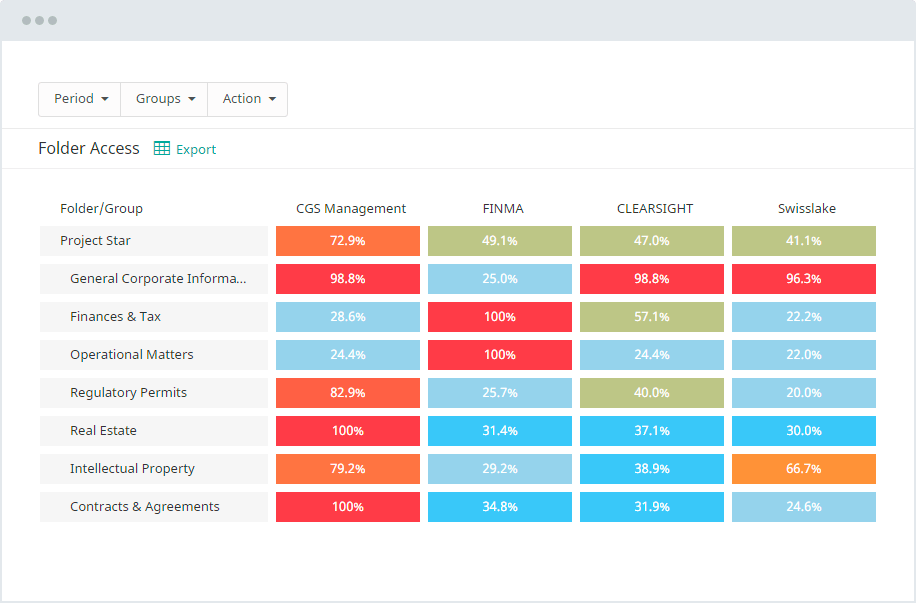
The virtual due diligence data room prevents unauthorized data sharing by authorized persons. With audit logs, you can detect who viewed, edited, copied, or exported a file. It helps eliminate risks of data misuse or loss.
Read more about user management features in a virtual data room.
Granular access control
The virtual data room allows you to control access to confidential documents. Since the due diligence team consists of professionals with different areas of expertise, they are given access to documents that concern only their roles in the process. This function helps maintain the documents’ confidentiality and prevent unauthorized viewing. Some of the most common access permissions include:
- View
- Download encrypted PDF
- Download PDF
- Upload
Also, a due diligence virtual data room allows multi-layered authentication to ensure each user’s identity. It helps verify a user’s legitimacy before accessing files and ensures maximum security.
Dynamic watermarking
This feature in a virtual data room helps keep documents secure and reduces the risks of leaks. Some of the watermarks are customizable and serve to prevent documents from being perused. It embeds information like who is viewing, the location, and the time the document was viewed. It discourages unauthorized viewing and downloading and allows a source to be traced easily if confidentiality is breached.
Secure printing
There might be a need to grant a user access to print some of the documents. Secure printing right from a due diligence data room allows a client to easily print documents without converting them into PDF. It also eliminates saving documents outside the data room, where unauthorized users could easily access it. This virtual data room feature helps eliminate any intentional or unintentional data breaches.
Conversion to PDF
This data room function allows for bulk uploads and conversion of documents to PDF format for easy viewing. This ensures that all documents remain in their original state while the due diligence team interacts with them. It further makes it easy to track any changes made to the documents.
Third-party integrations
Virtual data rooms seamlessly sync with other web-based platforms important for the process of due diligence, including team-management platforms like Slack. It simplifies and accelerates the process, minimizing the need to download documents outside the data room.
Q&A section
The Q&A section allows for an interaction process during due diligence, where the team can ask questions about certain documents and get clarified in real time. While in a physical data room, the parties have to meet on-site, spending their time and effort. With virtual data rooms, this process is performed online.
The Q&A section feature allows the team to interact while referencing the documents in question. It enables notification alerts for questions to be immediately attended to, allowing for a smooth communication process. The screenshot below shows how the Q&A module in a virtual data room can look like.
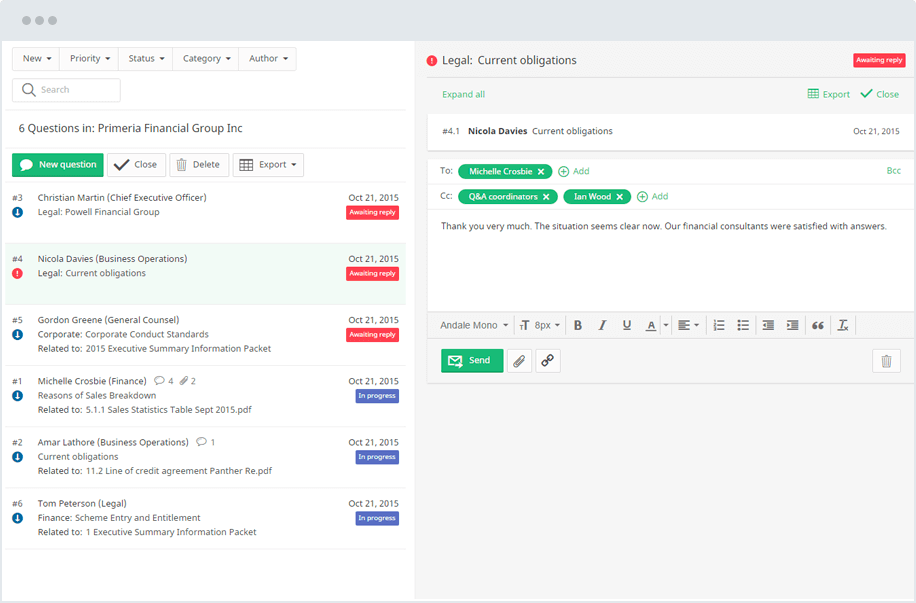
The team can make better decisions based on the productive collaboration, having in-depth information supplied almost immediately when needed. It makes it easier to spot buyers who are truly interested in the deal based on their depth of interaction with the provided files and helps successfully close the deal.
Expiry date
Each due diligence process is arranged in a specific time frame. It determines how long a user can access the documents stored in a virtual data room. The system allows you to effect an expiry date when access to the data room will be terminated. It can be done remotely after a determined period expires, or it could as well be set automatically before granting the user access.
It helps you stay in charge of the entire due diligence process, even when most of it is done virtually.
How to choose a due diligence VDR vendor
- List your must-have features first. Match the checklist above against your deal type, whether that is an M&A transaction, a fundraising round, or a real estate sale.
- Confirm the security certifications. Look for ISO/IEC 27001 and SOC 2 Type II on the vendor’s own site rather than taking a reseller’s word for it.
- Compare pricing models. Some vendors publish flat or tiered pricing, while others require a sales call for a quote. Review our virtual data room pricing breakdown before you get on a call, so you know what to ask.
- Read verified reviews. G2 and Capterra reviews often reveal support quality and onboarding friction that a sales demo will not show you.
- Request a live trial. Upload a sample folder structure and test the Q&A workflow with your own team before committing.
- Check language and support coverage. If your deal involves international parties, confirm multiple languages are supported for both the interface and live support.
Provider selection checklist
Use this short checklist alongside the vendor comparison table when you narrow down your shortlist.
| Question to ask | Why it matters |
|---|---|
| Is pricing published, or does it require a sales call? | Affects how quickly you can budget and compare options |
| Which security certifications are listed on the vendor’s own site? | Confirms the claim rather than relying on a reseller summary |
| Does the platform support the languages your deal needs? | Matters for cross-border and Quebec-based transactions |
| What is the average support response time? | Slow support during an active deal can stall the entire process |
| Can the trial convert directly into a live project? | Avoids re-uploading documents once you commit |
| Are AI features included, or gated behind a premium tier? | Changes the real cost of faster document review |
How to set up a data room for due diligence
Setting up a due diligence data room follows a repeatable sequence. Each step below builds on the one before it:
- Find the right data room provider.
Match features, security certifications, and support to your deal size, using the comparison table above as a starting point.
- Plan your due diligence data room structure.
Decide on top-level folders before uploading a single file. Most sellers group by category: financial, legal, HR documents, commercial, and operational.
- Gather and organize source documents.
Pull financial statements, contracts, tax history, and other records from wherever they currently live, and rename files consistently.
- Upload in bulk.
Use drag-and-drop or bulk upload tools to move large batches of documents into the correct folders.
- Apply access permissions.
Assign granular user permissions by group, so external advisors see only what their engagement requires.
- Turn on watermarking and audit logs.
Enable dynamic watermarking and confirm audit trails are recording every action before you invite outside users.
- Add stakeholders.
Invite buyers, their advisors, and internal teams, and assign each one the correct permission level.
- Run an internal test.
Ask a colleague to log in as a reviewer and confirm the folder structure, search function, and Q&A module all work as expected before the deal goes live.
Read more: For a broader walkthrough, see our guide on how to set up a virtual data room.
Due diligence data room structure
A clear due diligence data room structure saves reviewers hours of searching. A common top-level structure looks like this:
- Corporate and governance documents
- Financial statements and tax history
- Legal documents and material contracts
- Human resources and hr documents
- Intellectual property
- Real estate and physical assets
- Environmental and regulatory compliance
- Sales, customers, and supplier contracts
Due diligence data room checklist
Use the table below as a starting data room due diligence checklist. The exact list of the documents to review will vary by deal, but this covers the categories that come up in nearly every transaction.
| Document category | Examples |
|---|---|
| Corporate records | Articles of incorporation, cap table, shareholder agreements, board minutes, organizational charts, subsidiary and affiliate lists |
| Financial documents | Audited financial statements, profit and loss statements, budgets and forecasts, general ledger detail, accounts receivable and payable aging reports |
| Tax records | Tax history, federal and provincial filings, transfer pricing documentation, any outstanding tax disputes or audits |
| Legal documents | Material contracts, litigation records, lease agreements, licenses, powers of attorney, warranties, and guarantees |
| Human resources | Employment agreements, benefits plans, org charts, hr documents, compensation and bonus structures, employee handbooks |
| Intellectual property | Patents, trademarks, licensing agreements, proprietary technology records, domain name registrations, trade secret policies |
| Commercial | Customer and supplier contracts, sales pipeline, key account data, pricing schedules, distribution and vendor agreements |
| Real estate | Property titles, lease agreements, environmental assessments, zoning permits, facility maintenance records |
| Insurance | Active policies, claims history, coverage schedules, certificates of insurance |
Checklist by transaction type
Document requirements shift depending on the type of deal, whether you’re compiling a full M&A data room or preparing for a smaller transaction. The table below highlights what typically gets added or emphasized.
| Transaction type | Additional focus areas |
|---|---|
| M&A | Synergy analysis, integration planning documents, change-of-control clauses in material contracts |
| Fundraising | Cap table history, prior funding rounds, investor updates, growth metrics |
| Private equity | Portfolio company reporting, management incentive plans, exit scenario modeling |
| Real estate | Title records, zoning and environmental documents, tenant lease agreements |
| Clinical and life sciences | Trial protocols, regulatory correspondence, IP filings tied to the therapy or device |
Sell-side vs buy-side responsibilities
Due diligence moves faster when both sides know which tasks belong to them, whether the transaction follows a standard M&A due diligence process or something more specialized. The seller generally owns the data room itself, while the buyer owns the pace and depth of the review.
Confusion over who does what is one of the most common causes of delay in an otherwise well-run process, so here’s a quick breakdown:
| Responsibility | Sell-side | Buy-side |
| Data room setup | Builds the folder structure and uploads documents | Reviews the structure and requests missing items |
| Access permissions | Assigns permission levels to each buyer group | Confirms their team has the access they need |
| Q&A management | Assigns internal teams to answer questions promptly | Submits organized, specific questions rather than broad requests |
| Document accuracy | Confirms every uploaded file is current and complete | Flags discrepancies between documents and management claims |
| Timeline | Sets deadlines for document delivery | Sets deadlines for completing the document review process |
| Closing | Prepares the project archive once the deal closes | Confirms all outstanding questions are resolved before signing |
Data room management best practices
Good technology only goes so far without good habits behind it. The practices below come up repeatedly in well-run due diligence data room projects, regardless of which platform a team uses:
- Keep the folder structure consistent from day one. Reorganizing midway through review confuses reviewers and slows the document review process.
- Assign a single data room administrator on the sell-side to manage access permissions and respond to upload requests quickly.
- Review audit trails weekly during an active deal to spot which buyers are genuinely engaged and which have gone quiet.
- Set an expiry date for access as soon as the deal closes or falls through, rather than leaving old permissions active.
- Answer Q&A threads within a set turnaround time, ideally 24 to 48 hours, to keep momentum through a competitive process. For a closer look at how this fits into the wider deal, read about vendor due diligence in Canada.
- Watch for due diligence red flags early, rather than waiting until the final review stage. Our guide to due diligence red flags covers the most common warning signs buyers should not ignore.
Canadian data room considerations
A few practical considerations do not always come up in a generic global guide, but they matter for deals closing in this market.
| Consideration | What it means for your data room |
|---|---|
| Data residency | Some buyers, particularly in the public sector, financial services, and healthcare, prefer or require that data stay hosted within the country or in a jurisdiction with equivalent privacy protections. Ask any provider which data centre regions they support before signing. |
| Bilingual support | Many transactions touch Quebec-based targets or counterparties. Confirm that both the platform interface and live support cover French, not only English. |
| Cross-border exposure | Megadeals above $5 billion now account for 48% of global deal value, up from 39% a year earlier, meaning domestic targets increasingly attract international buyers who expect the same VDR standards used in the US and Europe. |
| Regulatory and tax filings | Due diligence carries specific requirements, including provincial tax filings and, where relevant, Competition Act considerations for larger transactions. Build a dedicated folder for these rather than folding them into a generic tax history section. |
| Deal size range | The top 10 public M&A deals accounted for over 74% of total deal value in 2025, while roughly half of deal volume still sits in transactions under $100 million. A due diligence data room solution needs to scale both up and down: a single-project subscription may suit a smaller deal, while a firm running several transactions at once will want multi-project management and volume pricing. |
Note: The cross-border and deal-size figures above come from PwC’s global mid-year 2026 outlook and Torys’ Q1 2026 Canadian M&A outlook.
Why businesses use VDR due diligence tools
Deal teams choose a due diligence virtual data room over email and generic file sharing for reasons that go beyond convenience:
- Accessibility. Reviewers in different cities or countries can easily access the same due diligence data at any hour, without waiting for a courier or a flight.
- Security. Encryption, granular permissions, and audit logs protect confidential documents in a way ordinary cloud storage does not.
- Speed. Full text search and automatic indexing help teams save time compared with searching through email attachments or shared drives.
- Accountability. Every document viewed is logged, which supports both internal governance and, if needed, a later legal review.
- Scalability. A firm managing many deals at once can standardize its process across every due diligence data room solutions project rather than reinventing the folder structure each time.
Conclusion
A due diligence data room gives buyers and sellers a secure, organized way to share the financial, legal, and operational documents a transaction depends on.
Choosing the right provider means weighing pricing transparency, security certifications, and AI-assisted features against your deal size and budget, then following a clear process to structure folders, set permissions, and manage the Q&A workflow from setup through closing.
Sell-side and buy-side teams each carry specific responsibilities, and a few consistent management habits, along with attention to Canadian considerations like data residency and bilingual support, keep the process moving without unnecessary delays.
Ready to compare options for your own deal? Explore the top virtual data room providers in Canada to find the right fit.
FAQ
What is a due diligence data room?
It is a secure online platform used to store and share the financial, legal, and operational documents needed to evaluate a company during a business transaction.
Which VDR is best for M&A due diligence?
For large, cross-border M&A, teams often choose platforms with dedicated project management and advanced redaction, such as Ideals, Datasite, or Intralinks. Mid-market M&A teams frequently choose Firmex or Ansarada for a balance of features and cost.
How secure are due diligence data rooms?
Reputable providers use encryption, granular access permissions, multi-factor authentication, dynamic watermarking, audit logs, and other security features to keep confidential information secure and traceable.
Can multiple parties access the same due diligence data room?
Yes. Unlike a physical data room, a virtual data room lets many reviewers work in parallel, each with their own access permissions and activity tracking.
How long should a due diligence data room stay open?
Most stay active for the length of the transaction, then close shortly after signing, though some sellers keep an archived, read-only copy for compliance records.